


Shopping Secure
2015 t/m 2026
Tweakers Awards
2022 t/m 2026
Website of the Year
2025 t/m 2026
Brand: QNAP
MPN: TS-453BT3-8G
Add to favorites
Redable offers you
- Free delivery from €100,-
- 14 days reflection period
- Customers rate Redable 9.2/10
- Business benefits with Rise
- More than 150,000 satisfied customers

Payment & shipping
More than 150,000 satisfied customers
Promotions and services
Need several units?
Ordering for your team or a rollout? We will gladly prepare a no-obligation quote for you, with a price tailored to your needs.
More information
Choose refurbished
Choose a refurbished device: 100% functional, with warranty and much cheaper than new. View our refurbished range.
More information
Product description
TS-453BT3
Your first Thunderbolt 3 + 10GbE NAS
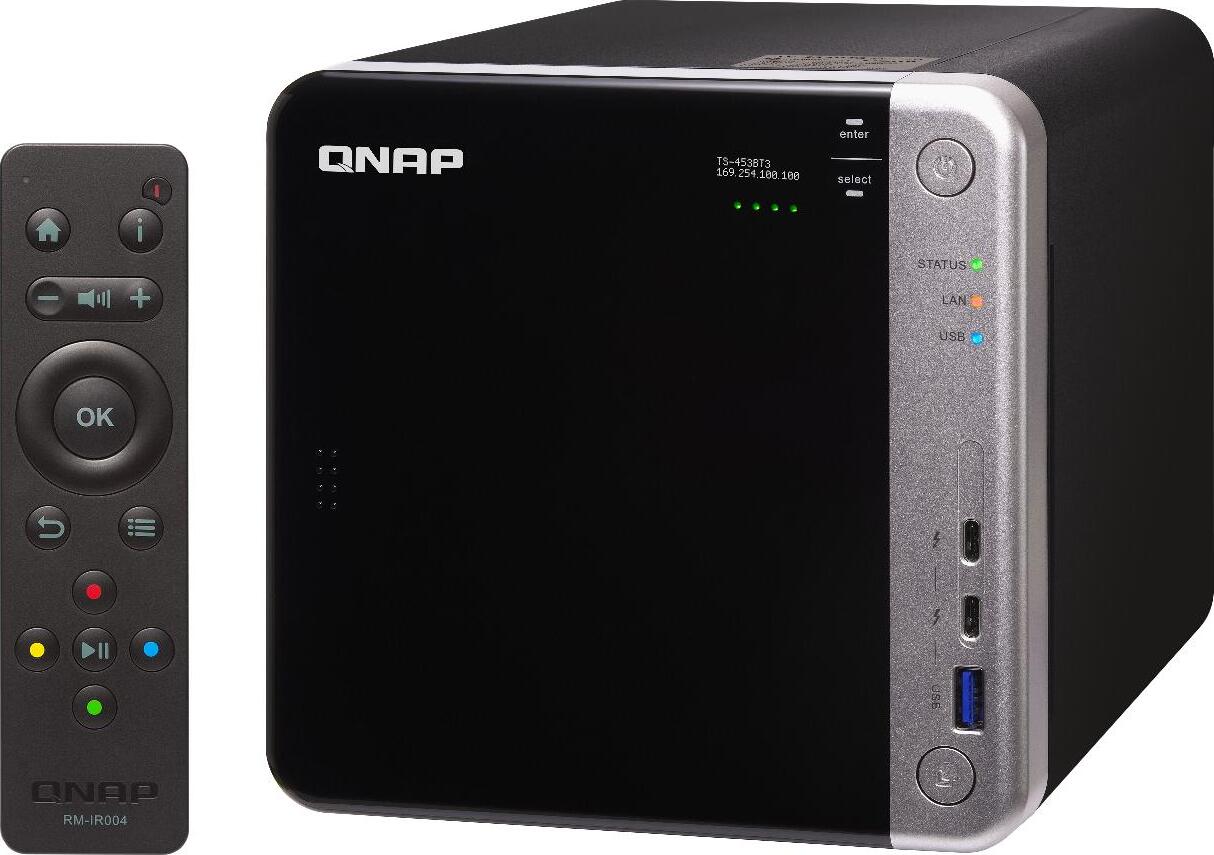
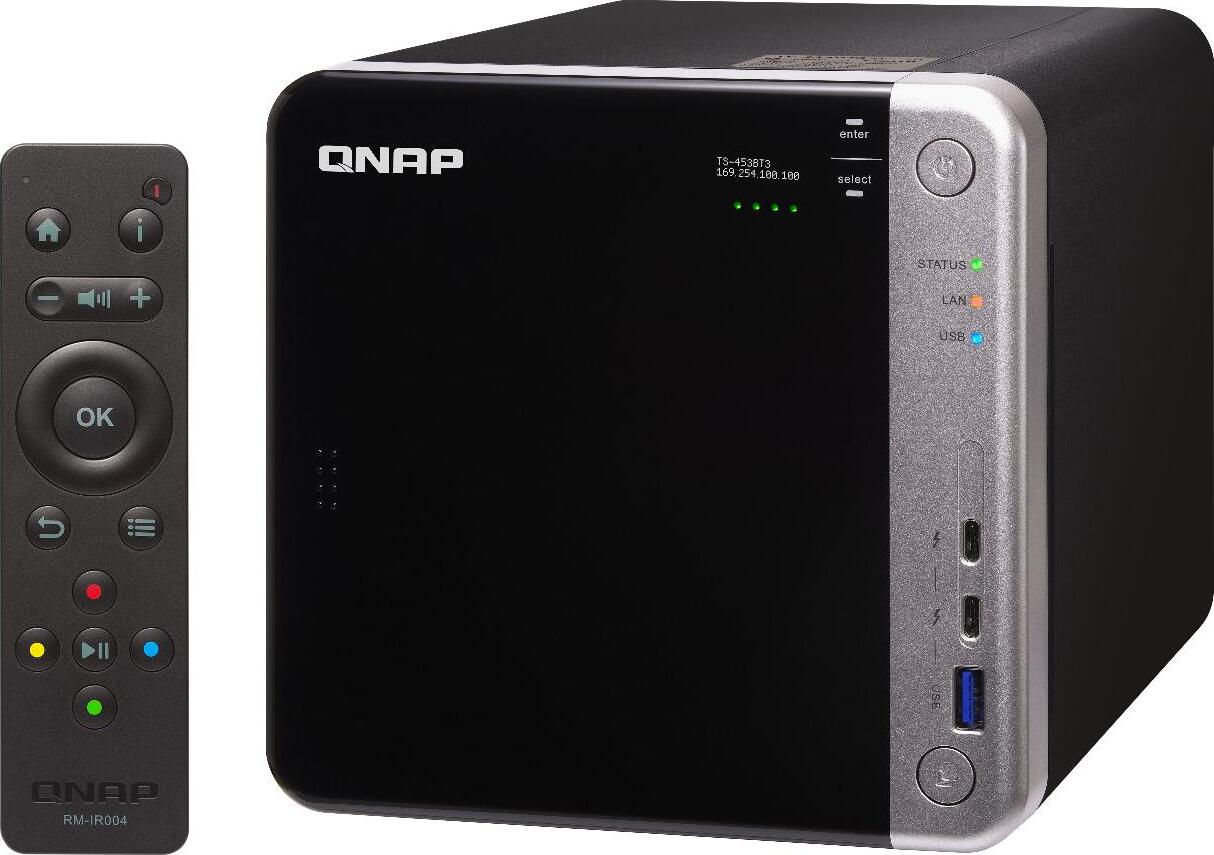
Featuring dual Thunderbolt™ 3 ports, coupled with M.2 SATA SSD caching and 10GBASE-T connectivity, the TS-453BT3 provides an ideal environment for professional collaborative media editing and high-speed file sharing. The TS-453BT3 features a sleek new look with an OLED panel and two capacitive touch buttons.
Runs faster with Thunderbolt™ 3 and 10GbE connectivity
Powered by an Intel® Celeron® J3455 quad-core 1.5GHz processor (burst up to 2.3 GHz), with up to 8GB DDR3L RAM, dual Gigabit LAN ports, and SATA 6Gb/s drives, the TS-453BT3 delivers up to 683 MB/s read/write speeds and up to 683 MB/s with AES-NI encryption, delivering high performance while also maintaining the security of your data. The Thunderbolt 3 port runs up to 514 MB/s, allowing for quick file access. You can also connect USB Type-C devices through the Thunderbolt 3 ports to transfer large media files across devices, bringing you a more efficient workflow.
Collaboration station for Mac and Windows
TS-453BT3 is the perfect match for users with Thunderbolt 3/Thunderbolt 4 Mac and can also be used with Thunderbolt 2 Mac by using a suitable adapter. The increased bandwidth of Thunderbolt 3 enables smooth video editing and faster file sharing for photographers, video editors and graphic designers. Up to 2 Thunderbolt devices can be connected to the TS-453BT3 to process real-time photo and audio editing simultaneously without impacting system performance. As Final Cut Pro® X 10.3 supports file sharing via SMB, Windows users and other devices utilizing Thunderbolt™ 3, 10GbE or GbE connections can join the editing workflow more efficiently.
Direct access to 10GbE network from your Mac
The innovative Thunderbolt-to-Ethernet converter (T2E) allows your Mac® devices to access 10GbE networks via the TS-453BT3, providing flexible, convenient and highly-efficient data transfer without needing to buy extra adapters or converters.
Greater efficiency with SSD caching and 10GbE connectivity
The pre-installed dual-port M.2 SATA SSD/10GBASE-T expansion card enables caching or Qtier auto-tiering technology to improve NAS performance without occupying disk bays of the NAS.
The 10GBASE-T port ensures that the TS-453BT3 meets 10GbE infrastructure requirements and can efficiently manage data transfers requiring high-bandwidth.
Simple, sleek and trendy look
The TS-453BT3 features a sliding cover design with tool-less 3.5-inch hard drive installation, making it easier for you to set up and maintain. The OLED front panel displays system information (including CPU temperatures, fan speed, and storage capacities of hard drives, volumes and LUN), allowing you to quickly view overall system status. Dust-proof capacitive touch buttons allow you to easily wake up the screen, change network IP settings and host password or even restart and shut down the system.
Complete backup solution for peace of mind
QNAP provides reliable and flexible backup and disaster recovery solutions to help businesses and organizations perform daily data backup tasks for computers, VM, and other devices in a highly-efficient way.
Windows® and Mac® backup
Use the free QNAP NetBak Replicator to backup/restore data on a Windows® computer. For Mac® devices, backup tasks can be performed with Time Machine® support.
Hybrid Backup Sync
With integrated data backup, restore and synchronization (using RTRR, rsync, FTP, CIFS/SMB protocols), Hybrid Backup Sync helps you easily backup or synchronize data on the TS-453BT3 to other QNAP NAS, remote servers or cloud storage.
Snapshots for volume/LUN
Snapshots help protect your data and block-level snapshots provide even faster backup and restoration, helping to mitigate the effects of malware or a ransomware attack. The TS-453BT3 supports up to 256 snapshots per volume or LUN, and maximum 1,024 snapshots per NAS.
Backup for virtual machines
The TS-453BT3 provides high potential storage capacity. With its high performance and integrated virtualization applications, support for popular third-party virtualization solutions, snapshots to record complete system VM status, the TS-453BT3 provides an ideal solution for backing up VMs.
QTS - The intelligent and intuitive NAS operating system
With multiple applications and functions, QTS enhances management efficiency, personal productivity, multimedia, and much more. The user-friendly QTS features an intelligent desktop that allows you to find desired functions quickly, monitor important system information on a real-time basis, open multiple application windows to run multiple tasks concurrently with greater working efficiency, and provides a built-in App Center with install-on-demand apps to extend NAS functionality. Empowered by intelligent agent services that simplify system operations and management, QTS breaks down barriers of devices, platforms, and geography to provide you with the optimum cloud experience.
High-speed VM Backup Solution
With Hyper Data Protector, the TS-453BT3 becomes an agentless backup tool for unlimited VMware® vSphere and Microsoft® Hyper-V VM backup. Hyper Data Protector features incremental backup, global deduplication, backup scheduling and recovery compression that provides you with a cost-effective and reliable disaster recovery plan, ensuring 24/7 operation of your services.
File sharing and synchronization
The TS-453BT3 supports SMB, NFS and AFP, allowing you to quickly share files to Windows®, Mac®, and Linux®/UNIX® devices. With QNAP's Qsync app, the TS-453BT3 becomes a safe data center for file synchronization with huge storage potential. Any file uploaded to TS-453BT3 can be synchronized to all the linked devices such as computers, laptops and mobile devices. You can also sync shared folders to increase the flexibility of collaboration and file sharing.
Directly view multimedia
By connecting the TS-453BT3 to a HDTV or AV receiver via the HDMI output, you can directly view multimedia content saved on TS-453BT3 on a bigger screen. You can download and install versatile multimedia apps from Ubuntu Software Center through QNAP Linux Station. QNAP's HD Station also allows users to directly enjoy multimedia using HD Player or third-party players such as Plex Home Theater.
Qsirch finds what you need
Qsirch is QNAP's full-text search engine that can quickly find desired files on your NAS. Qsirch can search through over 6,000 file formats and can use over 30 search conditions. Recommended or similar files are also displayed in the search preview page based on set keywords and conditions. Professional photographers can even search files through the camera’s lens type, greatly shortening time in finding files and can spend more time concentrating on editing.
Real-time transcoding for an excellent cross-device media experience
Featuring advanced 9th-generation Intel® HD Graphics, the TS-453BT3 supports dual-channel 4K H.264 hardware decoding and real-time transcoding, allowing you to convert videos to universal file formats that can be smoothly played on multiple devices*.
Get things done with one button
The TS-453BT3 provides a free Remote Control (RM-IR004). You can customize the actions of individual buttons of your QNAP remote control using QButton, such as viewing a preset surveillance channel in Surveillance Station, providing you with convenient control of your multimedia experience.
NAS as a multi-OS platform
Virtualization Station and Container Station bring comprehensive solution for virtualization environment deployment. You can count on QNAP virtualization apps to easily find a suitable solution tailored to your specific requirement.
Virtualization Station allows you to run multiple Windows®, Linux®, UNIX® and Android™ virtual machines on TS-453BT3. You can use Virtual Network Computing (VNC) through a browser to manage the VMs. It’s ideal for organizations to run multiple applications on a single NAS.
Container Station integrates LXC and Docker® lightweight virtualization technologies. You can download apps from the built-in Docker Hub® to easily import/export container apps and manage access control, enjoying the benefit of easy installation, transferability and high-efficiency.
More productivity applications
IFTTT Agent
IFTTT allows you to freely connect your QNAP NAS with useful apps and gives you the ability to create user-defined rules/tasks.
QmailAgent
Centrally manage and check multiple email accounts on one platform. You can also backup all the emails on NAS for higher confidentiality.
Browser Station
Enables remote access through NAS browsers to access local LAN resources without going through complex VPN setting.
QIoT Suite Lite
Combines the security and large capacity of QNAP NAS while providing an IoT solution on a private cloud. It only takes three steps to quickly deploy your own IoT application.
Mobile Apps
Simplifies file access, NAS management, multimedia experience, surveillance, and download tasks on mobile devices with QNAP apps.
Easy storage expansion
You need an easy solution to increase storage capacity when running out of space. QNAP provides several ways to expand your NAS storage as needed to accommodate data or business growth.
Upgrade RAID Capacity
Hot swap lower capacity drives with larger capacity drives so that your QNAP NAS can grow with your business.
Attach Expansion Enclosure
Connect expansion enclosures to the TS-453BT3, and manage NAS storage expansion with the user-friendly Storage & Snapshots Manager app.
VJBOD
Use VJBOD (Virtual JBOD) to expand your storage capacity by using the unused storage of another QNAP NAS. Up to 8 QNAP NAS can be mounted as local disks on the TS-453BT3.**
Migrate to a New NAS
Install your NAS hard drives into a larger QNAP NAS with more drive bays and retain all your existing data and configurations.
Questions about this product?
How can I help you? This QNAP NAS provides fast data transfer and central file storage.
Product list changed. Ask again for these products.
Advice and inspiration

We hear more and more about 'device as a service' (DaaS), but what exactly is it? In this blog article we provide a detailed explanation of DaaS and tell you whether it is something for your company.
Specifications
General
DPN
7822937
Merk
QNAP
MPN
TS-453BT3-8G
Duurzame Keuze
No
Storage media
Bad block scan
Yes
Supported file systems
FAT32, HFS+, NTFS, ext3, ext4
Hot-swap drive bays
Yes
Online RAID expansion
Yes
Online RAID migration
Yes
RAID levels
0, 1, 5, 6, 10
RAID support
Yes
Number of M.2 (M & B) slots
2
Storage drive sizes supported
2.5,3.5
Supported storage drive interfaces
Serial ATA, Serial ATA II, Serial ATA III
Number of storage drives supported
4
Supported storage drive types
HDD & SSD
Installed storage drive type
Nee
Storage drives installed
Nee
Processor
Processor ARK ID
95594
Conflict Free processor
Yes
Maximum internal memory supported by processor
8 GB
CPU configuration (max)
1
ECC supported by processor
No
PCI Express configurations
1x2+2x1, 4x1
PCI Express slots version
2.0
Processor boost frequency
2.3 GHz
Processor cache
2 MB
Processor cache type
Smart Cache
Processor code
SR2Z9
Processor codename
Apollo Lake
Processor package size
24 x 31 mm
Processor socket
BGA 1296
Processor threads
4
Stepping
B1
Thermal Design Power (TDP)
10 W
Tjunction
105 °C
Processor lithography
14 nm
Processor cores
4
Processor frequency
1.5 GHz
Processor family
Intel® Celeron®
Processor model
J3455
Processor manufacturer
Intel
Memory
Memory form factor
SO-DIMM
Memory slots
2
Maximum RAM supported
8 GB
Internal memory
8 GB
Internal memory type
DDR3L
Network
Dynamic DNS (DDNS)
Yes
WLAN adapter supported
Yes
Wake-on-LAN ready
Yes
iSCSI support
Yes
Jumbo frames support
Yes
DHCP server
Yes
DHCP client
Yes
Wi-Fi
No
Ethernet LAN data rate supported (max)
10000 Mbit/s
Ethernet LAN data rates
1000,10000 Mbit/s
Ethernet LAN
Y
Ports & interfaces
Microphone in
Yes
Audio in/out
Yes
Number of SATA III connectors
4
Thunderbolt 3 ports quantity
2
HDMI version
1.4b
HDMI ports quantity
2
USB 3.2 Gen 1 (3.1 Gen 1) Type-A ports quantity
5
USB port
Ja
Ethernet LAN (RJ-45) ports
3
Design
Cable lock slot type
Kensington
Cable lock slot
Yes
Display type
OLED
Built-in display
Yes
LED indicators
HDD, LAN, Status, USB
Fan diameter
12 cm
Number of fans
1 fan(s)
Product colour
Black
Cooling type
Active
Chassis type
Tower
Performance
Mac compatibility
Yes
Access Control List (ACL)
Yes
S.M.A.R.T. support
Yes
Security algorithms
256-bit AES, FIPS 140-2, HTTPS, SSH, SSL/TLS
Built-in FTP server
Yes
System log
Yes
Hot spare
Yes
Share folder
CIFS/SMB, FTP, WebDAV
Share folder access right management
Yes
Built-in iTunes server
Yes
Web-based management
Yes
On/off switch
Yes
Browser supported
Apple Safari 7, Google Chrome, Microsoft Internet Explorer 10, Mozilla Firefox
Multilingual support
Yes
Backup features
Cloud, iSCSI LUN
Backup function
Yes
Device class
Home & Home Office
Type
NAS
Energy
AC input frequency
50 - 60 Hz
AC input voltage
100 - 240 V
Power consumption (typical)
38.101 W
Number of power supply units
1
Power supply unit (PSU) capacity
120 W
Power supply location
External
Weight and size
Package weight
4.05 kg
Weight
2.51 kg
Height
168 mm
Depth
226 mm
Width
170 mm
Requirements for the environment
Storage temperature (T-T)
-20 - 70 °C
Contents of the package
Remote control included
Yes
Number of screws
28
Quick installation guide
Yes
Cables included
AC, LAN (RJ-45)
External power adapter
Yes
Processor special features
Memory types supported by processor
DDR3L, LPDDR3-SDRAM, LPDDR4-SDRAM
Memory channels supported by processor
Dual
Enhanced Intel SpeedStep Technology
Yes
Execute Disable Bit
Yes
Idle States
Yes
Intel 64
Yes
Intel Enhanced Halt State
Yes
Intel Identity Protection Technology version
1.00
Intel Secure Key Technology version
1.00
Intel Small Business Advantage (SBA) version
0.00
Intel Stable Image Platform Program (SIPP)
No
Intel Stable Image Platform Program (SIPP) version
0.00
Intel Trusted Execution Technology
No
Intel Virtualization Technology (VT-x)
Yes
Intel Virtualization Technology for Directed I/O (VT-d)
Yes
Intel VT-x with Extended Page Tables (EPT)
Yes
Maximum number of PCI Express lanes
6
Thermal Monitoring Technologies
Yes
Home Networking (by Intel)
Yes
UART
Yes
Intel Clear Video Technology
Yes
Intel Rapid Storage Technology
No
Intel Secure Boot
Yes
Intel Smart Connect Technology
No
Number of execution units
12
Intel Secure Boot Technology version
1.00
Intel Smart Connect Technology version
0.00
Intel Smart Response Technology version
0.00
Graphics
Number of displays supported (on-board graphics)
3
Maximum on-board graphics adapter memory
8 GB
On-board graphics adapter model
Intel® HD Graphics 500
On-board graphics adapter base frequency
250 MHz
On-board graphics adapter dynamic frequency (max)
750 MHz
On-board graphics adapter burst frequency
750 MHz
Other specifications
Digital Living Network Alliance (DLNA) certified
Yes
Technical details
Harmonized System (HS) code
84714100